I wanted a todo list that stayed out of my way, lived in plain text, and gently reminded me of what I said I’d do. Not another app, not another tab. Just something that fits naturally into my terminal workflow.
So I built a small CLI tool in Elixir.
The idea is simple. Todos are stored as Markdown checkboxes in ~/.todo.md. The tool lets me list tasks, add new ones, mark them as done, or remove them. It’s compiled as a single executable using Mix escript, so it behaves like any normal Unix command. No runtime, no services, no dependencies once built.
What made it interesting was integrating it with the shell.
I added a small shell script that runs when a terminal opens. If it’s been more than an hour since I last saw my todo list, it prints it automatically. While the terminal is open, pressing Enter on an empty prompt will show the list again, but only if another hour has passed. It’s time-based, quiet, and never interrupts real commands.
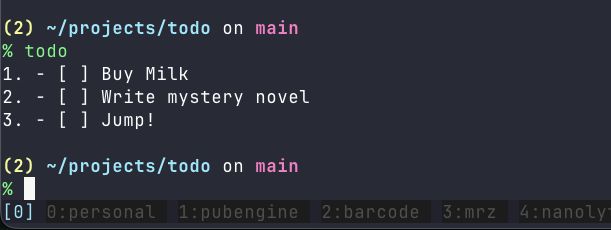
This turns the terminal into a soft reminder system. No notifications, no popups, no guilt. Just a quick glance at what matters, exactly where I already work.
Elixir turned out to be a great fit for this. Pattern matching makes the CLI parsing trivial. Immutable data keeps the logic straightforward. And compiling to a single binary makes distribution feel old-school in the best way.
The result is a tiny tool that feels personal, boring, and reliable. Which is exactly what a todo list should be.
Sometimes the best productivity tools are the ones you barely notice, until you stop using them.